Your go-live shouldn't be a gamble.
Clairity gives your team a single command center to plan, assign, and execute cutovers and go-live events — from the first task to the final sign-off.
5
Purpose-built project views
100%
Audit coverage — every change logged
0
External tools needed to run your cutover
See what Clairity looks like in action.
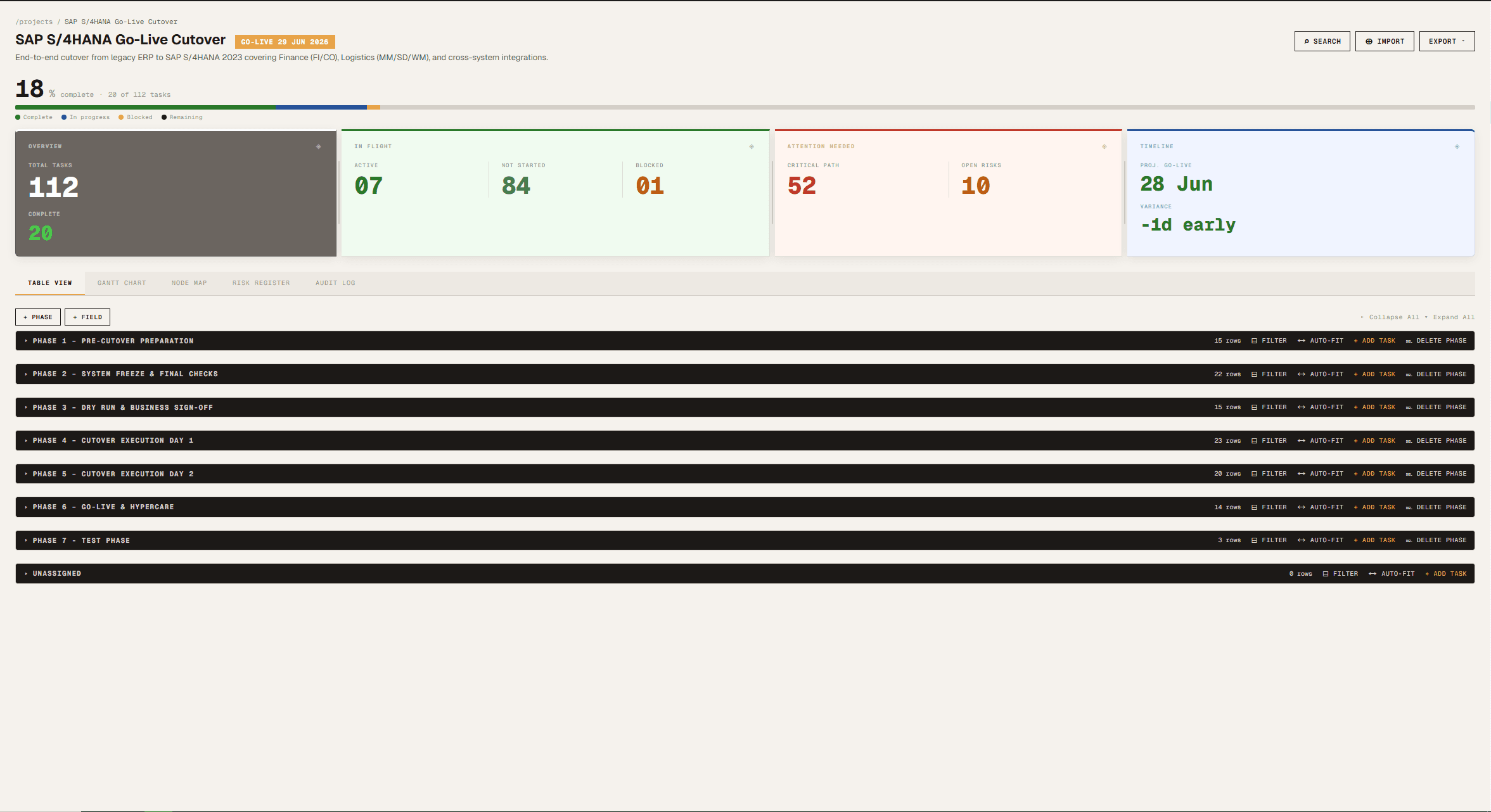
At-a-glance stat tiles, phase breakdown, and go-live timeline — all on one screen.
Go-lives still run on spreadsheets, emails, and hope.
Tasks scattered across emails, Slack threads, and shared drives
No single view of who owns what — or what's blocked
Missed dependencies that cascade into outages
No audit trail when things go wrong post-cutover
Retrospectives with no data — just gut feelings
One structured runbook. Every person. Every phase.
Spreadsheet-style task table — familiar and fast to use
Owners and due dates on every task, visible to everyone
Dependency tracking that flags blockers before go-live
Full audit log of every status change and update
Phase-based planning: pre-cutover, live window, post-cutover
Your team already knows how to use a spreadsheet. Here's what you're missing.
Everything you need to run a clean cutover.
Spreadsheet Task Grid
Create and manage tasks in a familiar table layout. Tab through cells, inline-edit, and keyboard-navigate — no clunky modals.
Dependency Tracking
Link tasks to their blockers. See the full dependency chain at a glance and resolve conflicts before they cause outages.
Risk Register
Log, categorize, and track risks throughout the project. Assign owners and mitigation plans so nothing slips through.
Phase-Based Planning
Organize work into phases — pre-cutover, go-live window, post-cutover. Each phase has its own task table and progress tracking.
Team Management
Invite your team, assign roles, and ensure every task has an owner. Everyone knows their responsibilities before go-live day.
Reports & Audit Log
Generate custom reports and review a complete audit trail of every change. Essential for post-mortems and compliance reviews.
Built for teams who can't afford a failed go-live.
From a 10-person startup migrating databases to an enterprise ERP rollout across 50 countries — Clairity scales to the complexity of your cutover.
From blank runbook to executed cutover in three steps.
Build Your Runbook
Create your project, add phases, and populate tasks with owners, due dates, durations, and dependencies. Import from CSV or build from scratch.
Assign & Brief Your Team
Invite team members, assign task ownership, and share the runbook. Everyone arrives on go-live day knowing exactly what they need to do and when.
Execute & Track Live
Watch stat tiles update as tasks complete. Flag blockers on the Gantt, mark critical path tasks done, and export a stakeholder report the moment you go live.
Simple, honest pricing.
Start free — no credit card required. Upgrade when your project demands it.
Free
Get started with one project and a small team. No credit card needed.
Get Started Free →Paid
Unlimited projects and team members for organizations that are serious about execution.
Start Free, Upgrade Later →Enterprise
3+ admins, dedicated support, SSO, and custom terms for larger organizations.
All plans include a free tier to get started. Upgrades take effect immediately. Cancel anytime.
Common questions, answered.
Is Clairity only for IT cutovers?
No. While Clairity is purpose-built for the structure of cutover and go-live events, it works equally well for any project that needs phases, task ownership, dependencies, and a clear audit trail — product launches, office relocations, compliance programs, or any complex rollout.
How is this different from Jira or Monday.com?
Those are general-purpose project management tools. Clairity is built specifically for the cutover runbook structure — phases, critical path, dependency gates, rollback procedures, and a live execution view on go-live day. You get a focused tool that doesn't require weeks of configuration.
Can I import my existing Excel runbook?
Yes. Clairity supports CSV import. You map your columns during the import step, so your existing work isn't wasted.
What happens if I go over the task limit on the free plan?
You can still view and complete existing tasks — nothing breaks mid-cutover. You just can't add new tasks until you upgrade.
Do team members need a paid seat?
No. You pay for one account as the project owner. Team members you invite can log in and update their tasks without needing their own paid plan.
Is there a rollback if something goes wrong?
The audit log gives you a full timestamped history of every change made to the project. Each task also has a dedicated rollback procedure field so your team always knows the recovery steps.
Get in touch
Have a question, a feature request, or want to learn more about Clairity? Fill out the form and we'll get back to you within one business day.
Demos available on request
Want to see Clairity in action before you commit? Check the box on the form and we'll schedule a walkthrough tailored to your team's use case.
Run your next cutover with confidence.
Stop managing go-lives in spreadsheets. Give your team the structure and visibility they need to execute flawlessly.